
Automatic Background Removal
Manual Refinement
Background Changer
Object Removal
Crop Photos
- Add Text and Stickers
- Conclusion
Automatic Background Removal
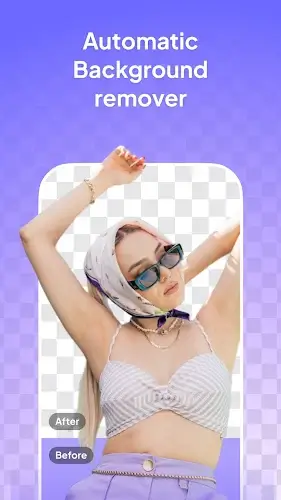
One of the standout features of SnapBG is its automatic background removal capability. Leveraging sophisticated algorithms and machine learning technology, the app effortlessly detects and eliminates backgrounds from your photos. This saves users significant time by removing the need for tedious manual selection. With just a few taps, you can achieve a clean white or transparent backdrop, providing an ideal canvas for your subject.
Manual Refinement
SnapBG elevates background removal with its precise manual refinement tools. These features enable users to fine-tune selections by erasing or restoring specific areas as needed. This level of control ensures that subjects are accurately isolated, preserving intricate details for a flawless outcome. Whether editing portraits, product shots, or other photographs, the ability to adjust selection boundaries makes SnapBG a versatile and user-friendly choice.
Background Changer
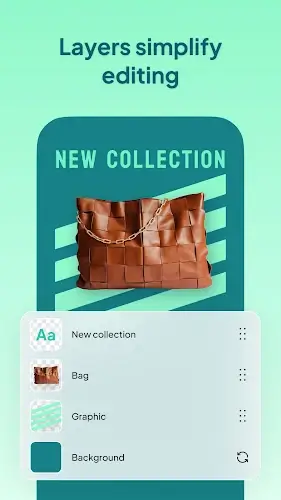
After removing the background, the app unlocks creative possibilities with its background changer feature. Users can choose from preloaded backgrounds or upload custom images, effectively altering the mood and context of their photos. This functionality is ideal for adding a unique touch to personal projects or professional marketing materials.
Object Removal
Beyond background manipulation, SnapBG allows users to delete unwanted objects from their images. Using the app’s “magic touch” feature with a simple tap, selected items are seamlessly erased, keeping photos free from distractions and clutter. This tool is particularly useful for cleaning up images and improving overall visual quality.
Crop Photos
SnapBG goes beyond background removal and object deletion by offering an intuitive cropping feature. Users can easily adjust the framing of their photos to meet specific requirements, making it a versatile solution for various editing needs.
Add Text and Stickers
To enhance creativity and personalization, SnapBG allows users to add text using a variety of stylish fonts. Additionally, a wide range of stickers can be applied to make images more vibrant and engaging. This feature is perfect for creating unique content for social media, personal projects, or professional use.
Conclusion
SnapBG is a powerful yet user-friendly photo background editor set to transform how we edit and enhance our images. From automatic background removal and manual refinement tools to background changing and object deletion features, it enables users to achieve professional results with ease. Whether you are a beginner or an experienced photographer, SnapBG provides the necessary tools to turn your photos into stunning works of art. With SnapBG, creativity knows no bounds.