
The PC version of Janggi Dosa, the long-range chess master, is now available on mobile. Visit www.janggidosa.co.kr to purchase this professional high-performance PC application.
Janggi Dosa—a powerful, professional AI chess program long enjoyed on PC—has launched for iPhone and Android. It ranked #1 in Board Games on the Korean App Store, #2 in All Games, and #6 in All Paid Games!
★ Like the PC version, Janggi Dosa delivers top-tier performance on smartphones.
★ Difficulty Levels: Beginner (Grades 18–13), Novice (12–6), Intermediate (5–1), Advanced (1–4), Expert (Grade 5+).
★ Tap a game notation shared online to load it directly in Janggi Dosa. You can view and save the record for later study.
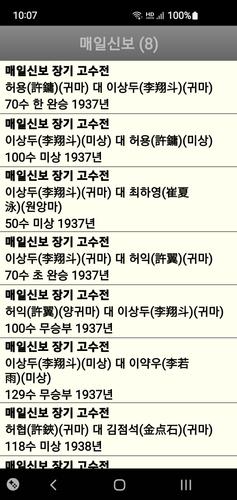
Download thousands of professional game notations freely available online.
★ Upload notations from your phone to your PC and analyze them using the PC edition of Janggi Dosa.
■■■ Android Version Features ■■■
\- Choose from 5 skill levels—from Beginner to Expert—suitable for all players.
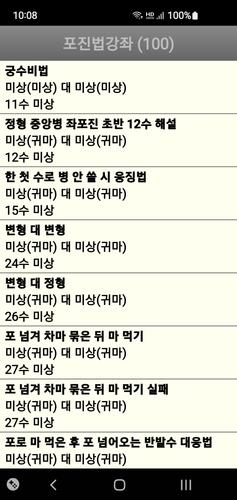
\- Learn chess strategies through structured tutorials on opening methods.
\- Experience varied gameplay with AI that employs diverse tactics, keeping each match fresh.
\- Select from multiple board style themes: Cotton, Linen, or Special.
\- Useful for match analysis: switch sides mid-game to explore different moves.
\- Set time controls per player with countdown alerts when time is low.
\- Human-like error simulation allows the AI to occasionally make intentional mistakes.
\- Pit multiple AI chess masters against each other.
\- Purchase the full version mid-game or after a match ends.
\- Use the hint feature to receive suggestions from Janggi Dosa.
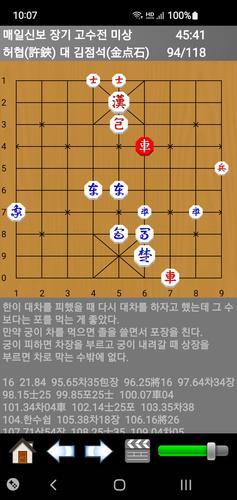
\- Save and review game records with ease.
\- Ideal for opening research—review notations and verify moves you're unsure about.
\- Auto-play function for convenient notation review.
\- Save multiple game records in one file for better organization.
\- Add comments to moves in the notation; edit them anytime.
\- Delete notations or edit their metadata.
\- Auto-save ensures your game records are stored automatically.
\- Study chess systematically using the opening database.
\- Set up custom board positions.
\- Create puzzles for the AI to solve, or challenge it with your own puzzles.
\- Analyze opening distributions to better understand various strategies.
\- Learning AI: Janggi Dosa avoids repeating past mistakes and improves from successful moves.
\- Search game records by tournament, player, or opening.
\- Resume interrupted games.
\- Customize the app's visual skin.
\- Change the chessboard design.
\- Choose between male or female voice options.
\- Let the app randomly assign your opening and style.
\- Use the app as a chess clock in person-to-person matches.
* Download the manual and notation files at www.janggidosa.co.kr/modules/board/bd_list.html?id=board_data.
* This is a demo with limited features. Unlock all functionality by purchasing the full version for ₩9,900.
* If you bought the app from One Store, update it only through One Store to avoid reverting to the demo.
* Changing your phone, number, or carrier doesn’t require repurchasing—just keep the original Google Account. With the same account, reinstalling the demo should restore your full version. Restart your device if needed. If your purchase account differs, add it in the Play Store under accounts and switch to it.
* For payment issues, contact Google Korea at 080-234-0051.
* Optional Permissions Notice
File access is required to view or save game notations.
What's New in the Latest Version 1.94
Last updated on Feb 8, 2024- Updated opening database.
- Updated opening method tutorials.
- Removed "Fixed-position left-flank elephant double-support combined operation" scenario.
- Added "Left Mandarin Duck vs Right Flank Horse" follow-up variant.
- Modified Crane Wing Formation setup.
- Bug fixes.